
Why your Evernote account still feels messy
October 19 2026 | Issue 117 | Link to this issue | Subscribe
Hi Reader –
Everyone I talk to wants an organized Evernote account. And when someone tells me theirs doesn't feel organized, the cause is almost always the same.
They're capturing plenty. But they aren't spending the time – consistently – to Title & File what they capture: giving each note a meaningful title and filing it where it belongs in their account.
Back in June I wrote about the titling habit behind the 40,000+ notes in my account. That issue covered how to write a good title. This one is about building the habit, so the titling and filing actually happen.
It's on my radar because next month I'm hosting the Title & File Sprint, which supports Academy members in building exactly this habit. Here are my top tips – the same ones Academy members will get support implementing during the Sprint.
Top Tips to Establish a Title & File Habit
Do a little, most days
Title & File doesn't need a big block of time. It needs regular time. Fifteen minutes three times a week works. So does five minutes a day. What matters is that it happens on a regular basis, because that's what keeps an account organized.
For the Sprint happening in the Academy, we're using one Pomodoro – 25 minutes – a day. That's a structure for building the habit over 14 days, not the amount you'll need forever.
Start where new notes land
For most people that's the default notebook, where email forwards, web clips, and quick captures arrive. Work from there first.
Your default notebook is a collection place, not a storage place. Notes are meant to pass through it on their way to where they belong. If notes stay there permanently, your account will never feel organized, no matter how much you capture or how good your other notebooks are.
Decide what each note is
Before you title anything, identify why you captured it and decide the very next step you need to take with it. You might take a specific action, hold onto it for future reference, or plan to read it later.
In GTD® terms, this is the Clarify step. It's a simple concept that takes seconds to do, but it's the step people resist. The thinking – or not deciding exactly what's next for a note – is the holdup. And it's why your account is messy.
Clarifying is a skill you can learn, and there's a framework for it. I'll be teaching it in the Sprint kickoff training, included in Academy membership.
Once you've clarified what's next, titling and filing the note is easy, especially when your Evernote skills are strong.
Title it for future you
Ask what you'd search for months from now, and put those words in the title. A contractor's invoice might become "Invoice: Rivera Design, Sept 2026." A scanned dishwasher warranty might become "Warranty for Bosch dishwasher purchased Oct 2026."
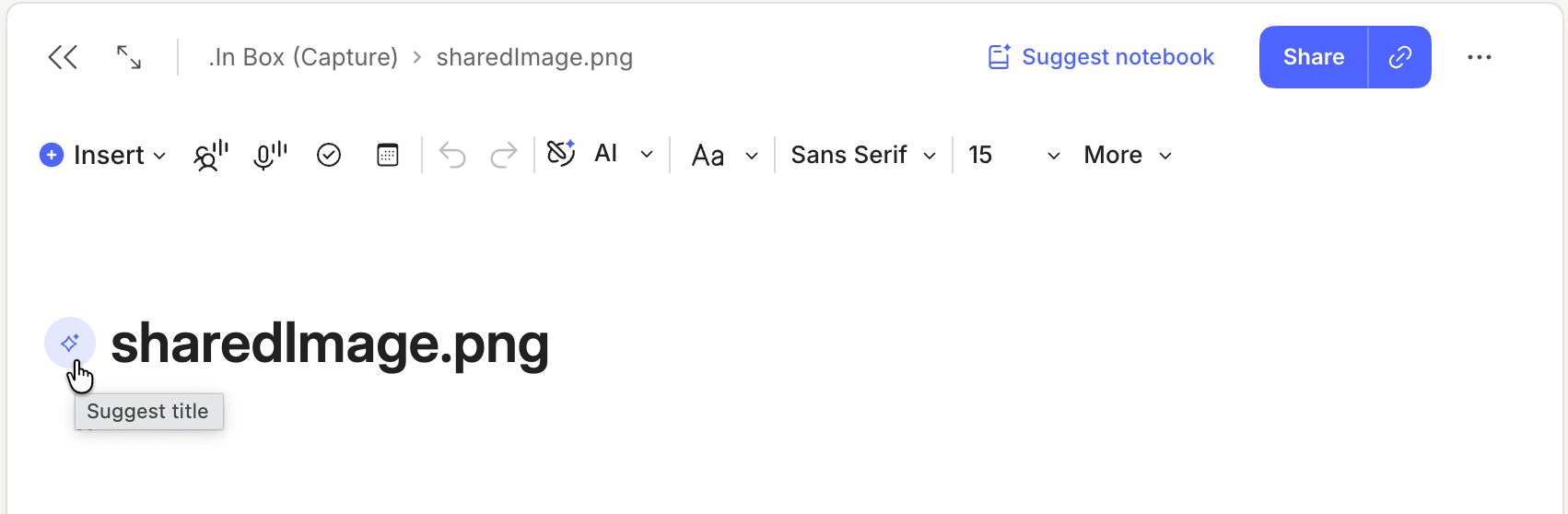
Let AI help. Click the Suggest title icon that appears next to your note title, and Evernote fills in a title based on what's in the note. If you don't like it, click again. You can cycle through suggestions until you see one you like, or use one as the starting point for your own.
As of v11.34.8 on desktop and web, this also works on notes that contain only attachments – photographed receipts, scanned bills, forwarded PDFs. Those are the notes most likely to sit with a default title that may or may not have meaning to you.
File it with the Move window
The Move window has always been the most powerful way to move notes, and you can open it with a keyboard shortcut instead of dragging. In v11.37.5 on desktop, it gained new filtering options, so you can show just notebooks or just spaces.
And as I wrote about earlier this month, moving a note no longer changes its Updated date. You can file a hundred old notes and sorting by date still tells you when you last worked on each one.
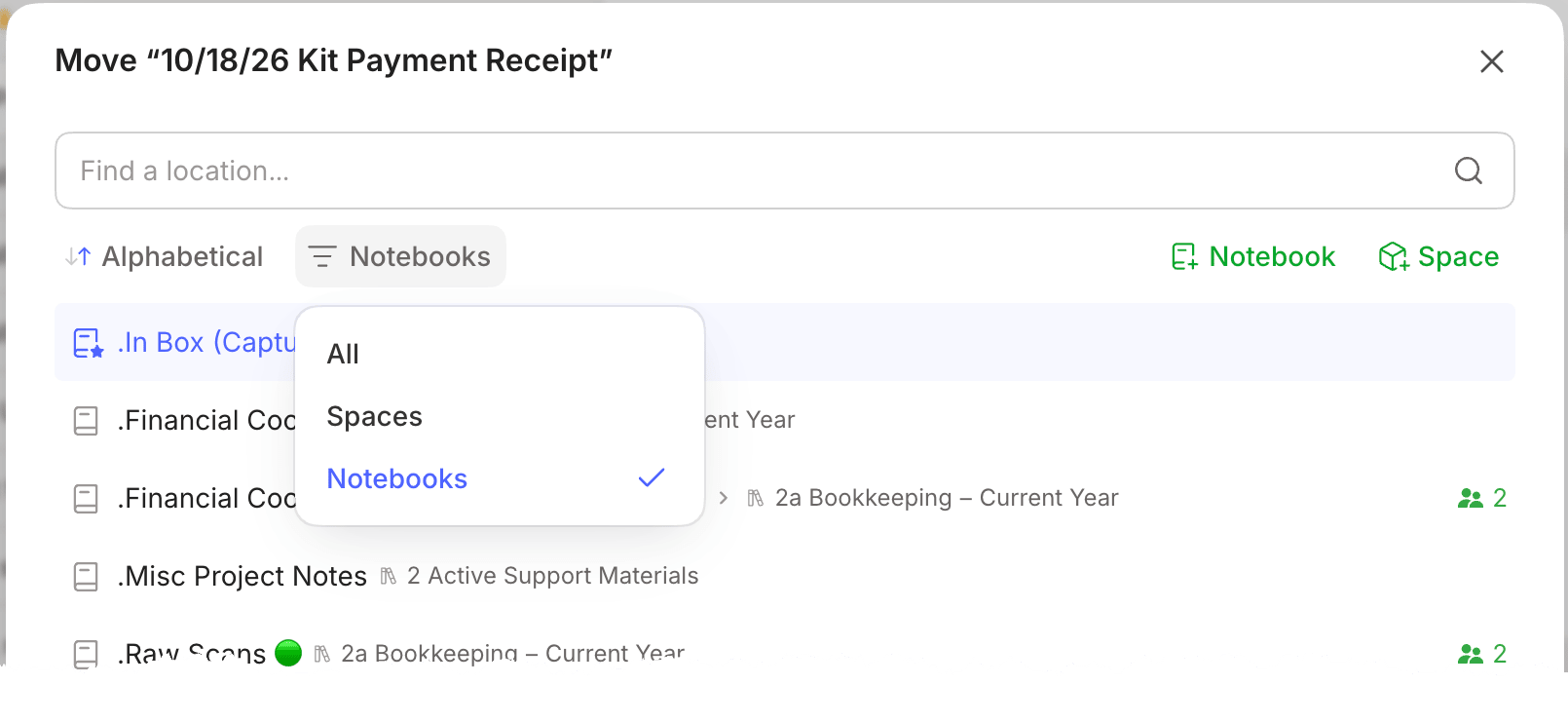
The move note dialogue box showing the new filters.
The Title & File Sprint
Tips are the easy part. Doing it efficiently, every day, is where most people stall, which is why I built the Title & File Sprint.
Starting Monday, November 9, I'm leading Academy members through 14 days of building this habit together. The commitment is one Pomodoro (25 minutes) of Title & File each day.
We start with a kickoff training on Monday, November 9. I'll walk through the thinking framework and the Evernote skills members need to establish a Title & File habit and keep their account organized for good.
The Sprint provides accountability, and it's fun to do alongside fellow members doing the same work.
By the end of the 14 days, participants will have cleared a real piece of their backlog and practiced Title & File enough times that it starts to feel automatic.
The Sprint is for Academy members. If you're not a member yet, join the Academy before November 9 and you can take part. You can even choose our new monthly membership option.
🧠 Academy Members: Learn more about the Title & File Sprint, which starts with a kickoff training on Monday, November 9 and runs for 14 days. It’s structured so you can succeed no matter what time zone you’re in. Just click the button in this post to join the Sprint.
This habit is the key to an organized account. So what can you commit to? Even five minutes a day is a good start. Give it a try.
And if you'd like support, join us in the Academy and be part of the Title & File Sprint.
Cheers to your productivity –
Stacey

Subscribe to auto-receive my next tip!
No fluff. Just practical, immediately actionable advice from someone who's been teaching Evernote mastery for over a decade. Sent every Monday, for free.