
My Assistant axed Granola thanks to Evernote
October 12 2026 | Issue 116 | Link to this issue | Subscribe
Hi Reader –
After last week's live Academy training on AI Meeting Notes, my assistant sent me her takeaway: she's canceling Granola (a buzzy standalone AI transcription app). She'd been paying $14 a month for it (US pricing), on top of the Evernote subscription she already has. In her words, Evernote transcription does everything she needs it to do.
AI Meeting Notes has evolved more in the past year than almost any other feature in Evernote, and she didn't realize all it can now do. Canceling Granola might not be the right call for everyone, but when you understand all that AI Meeting Notes can do, you might be able to reclaim an extra subscription fee.
What AI Meeting Notes Does Now
Start a recording in an Evernote note during a meeting, online or in person. When you stop, Evernote creates a full transcript and an AI summary in that same note. It works on desktop and mobile, supports more than 50 languages, and transcribes meetings up to two hours long.
Many things stand out compared with when it first launched late last year.
1️⃣ Your transcripts are searchable. Evernote now indexes them, so both regular search and AI search can find something that was said in a meeting, right alongside the rest of your notes.
2️⃣ The audio stays with the note. You can play back any part of the recording (something Granola doesn't offer). If a transcript gets a name or a number wrong, you can listen to exactly what was said.
3️⃣ Speaker management is intuitive. Evernote identifies the different speakers automatically, and you now have a lot of control over naming and editing them after the meeting.
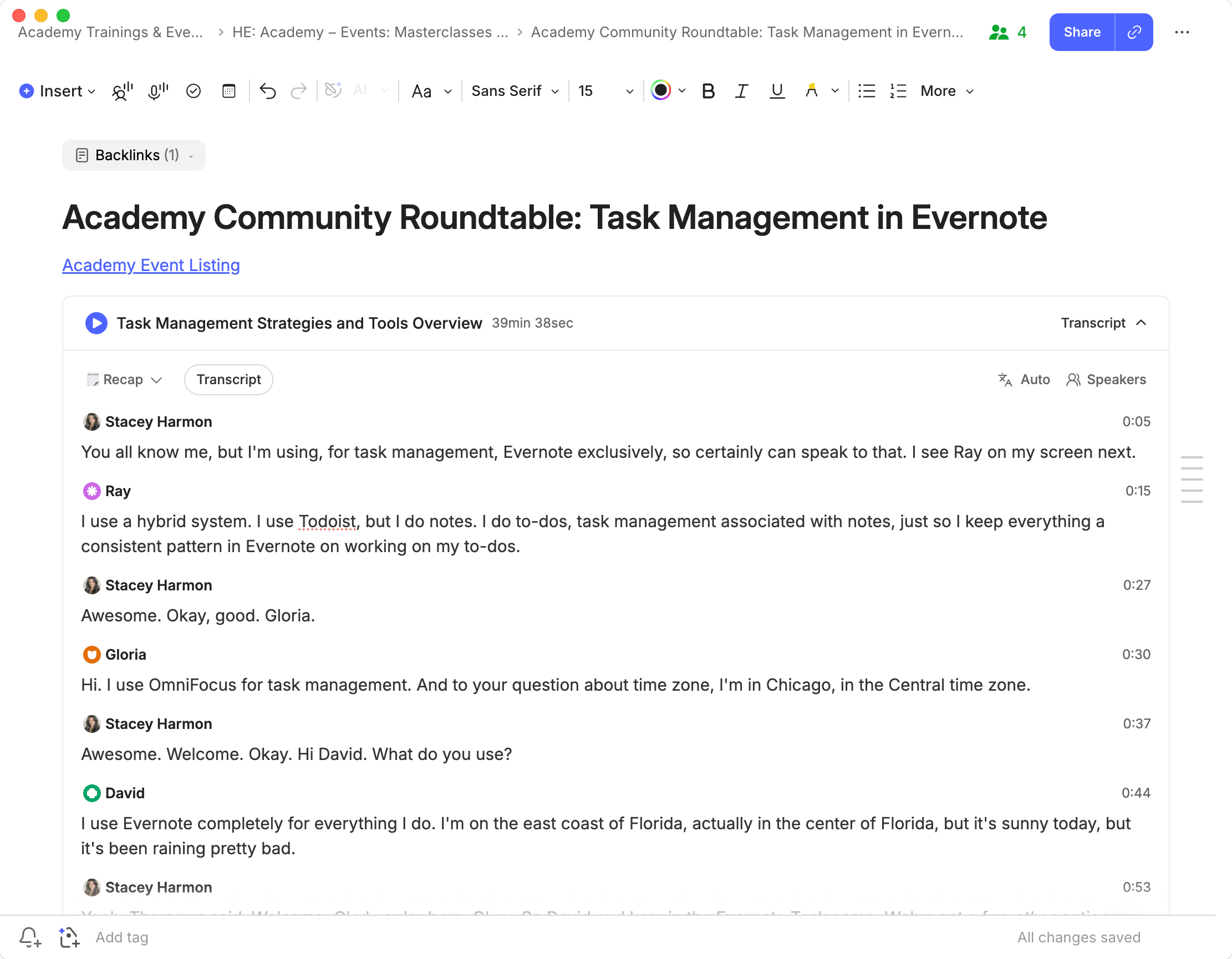
There's also a setting most people don't know exists.
4️⃣ In Evernote's AI settings, you can choose whether transcripts with speaker recognition use Evernote's internal model or an external one. Evernote describes the external model as more accurate, especially with multiple speakers. The trade-off is that your audio is processed by a third-party provider. I've had good results with both, so this is a personal choice.
5️⃣ And if you haven't tried the live captions that appear while you record, I covered those in July.
Shape the Summary With AI Prompts
This part is really powerful. By default, Evernote gives you a general recap of the meeting. But you can decide what the summary it creates looks like.
While the recording is running, you can choose which AI Prompt Evernote applies when it writes the summary. Use one of Evernote's prompts or write your own, and the summary comes back in your preferred format.
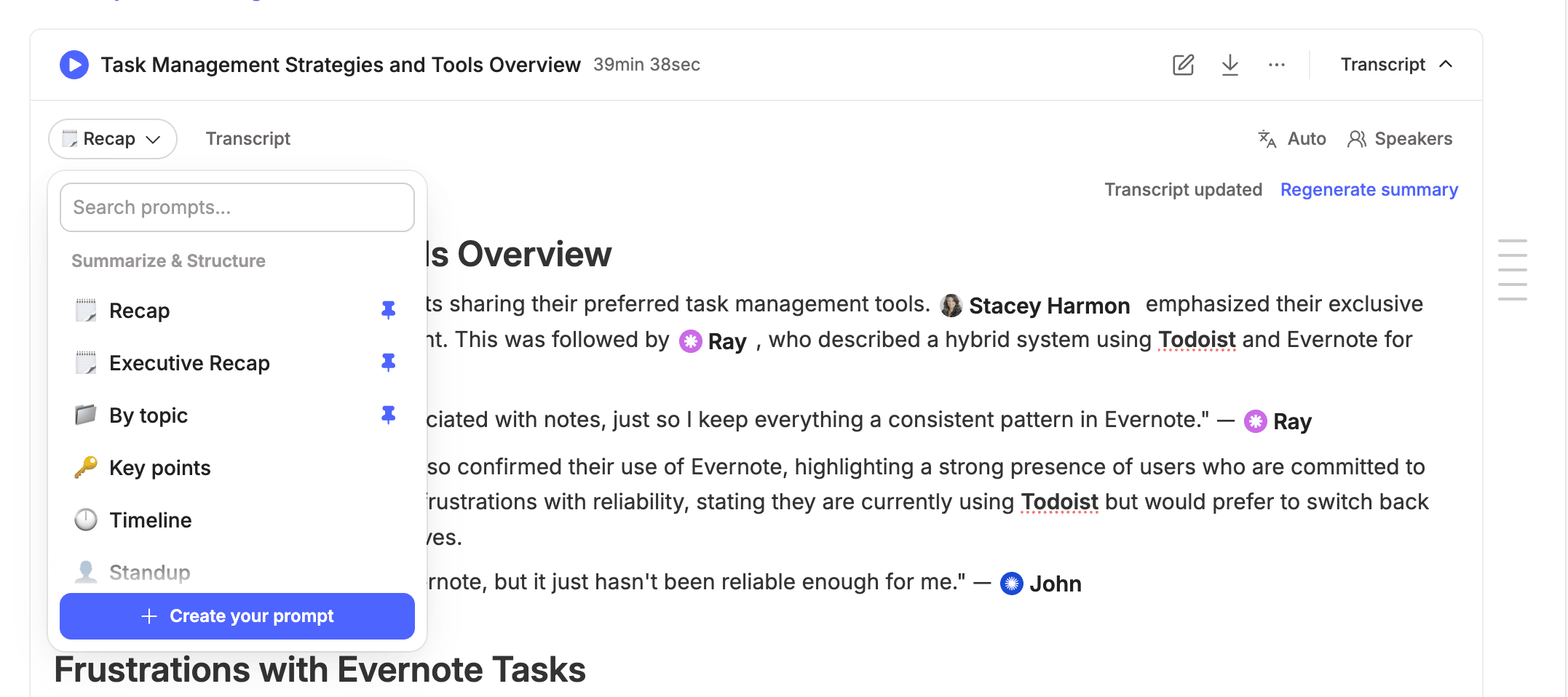
For business, picture a recurring client check-in. A prompt that always returns decisions made, what you owe the client, what the client owes you, and the next meeting date turns every call into the same structured note.
For personal use, think of a meeting with your financial advisor or a parent-teacher conference. A prompt that pulls out follow-up questions and deadlines gives you a clean list of what to act on.
Change your mind afterward? You can re-summarize the same recording with a different prompt at any time.
Link Meetings to Your Evernote Calendar
When a meeting is an event on your Evernote calendar, whether you add it directly or it comes from a connected Google or Outlook calendar, the recording note links to that event.
There's a practical bonus. If the recorder is still running after the meeting's scheduled end time, Evernote asks whether you want to stop it. In my first training on this feature almost a year ago, I confessed to an accidental 14-hour recording. Now Evernote catches it for me.
These are some great improvements, and I hope you picked up a few things you can use in your next meeting. Inside the Academy, I went into so much more.
🧠 Academy Members: Watch the full AI Meeting Notes training, where I walk through every setting, speaker management, the prompt workflow, and more. And, learn how to build custom prompts you can use to shape your meeting summaries in the AI Prompt training.
Are you recording your meetings using Evernote's AI Meeting Recorder yet? If not, give it a try. Otherwise, let me know what's stopping you.
Cheers to your productivity –
Stacey

Subscribe to auto-receive my next tip!
No fluff. Just practical, immediately actionable advice from someone who's been teaching Evernote mastery for over a decade. Sent every Monday, for free.