
The titling habit behind 40K organized Notes
June 1 2026 | Issue 98 | Link to Link to this issue issue | Subscribe
Hi Reader –
My fellow Evernote Certified Expert Jon Tromans recently invited me on his podcast, and we spent a bit of time on a topic I often teach inside the Academy: how to title Notes in Evernote.
Titling your Notes is one of the most important organizational habits you can practice in Evernote. It's a daily practice – one I call "Title & File" – and it's a key reason my 40,000+ Notes stay organized. But AI is changing how I think about this practice, and I want to share why.
AI is making it easier to title your Notes well, and Semantic Search is making it easier to find what you titled, even if the title isn't perfect. The habit still matters. It just requires less effort than it used to.
How AI Is Evolving This Practice
Two of Evernote's AI features directly affect titling, and both lower the friction.
AI Title Suggestions
Most Notes already have some kind of title, often inherited from the capture method. But there's a difference between a default title and an intentional one. A thoughtful, keyword-rich title is what makes a Note findable months or years later.
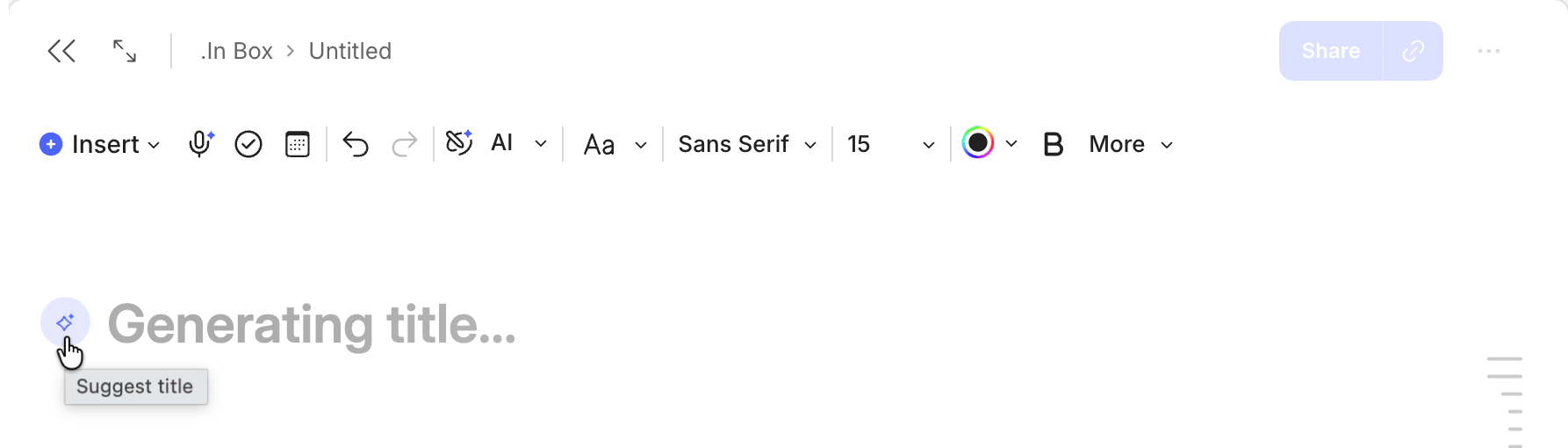
And now, with Evernote's most recent AI feature – AI Title Suggestions, available on Desktop and Web – any Note with at least 250 characters in the body can generate a suggested title in one click.
Evernote's AI reads the content and proposes a keyword-rich title for you. It likely won't match your preferred format, but it gives you a strong starting point – and it makes the habit of intentional titling faster to practice.
Semantic Search (Search powered by Evernote's AI)
Before Semantic Search, the pressure on getting the exact right words in a title was higher. If you titled a Note "Trip to Portugal – Spring Ideas" but later searched for "vacation planning," you might not find it. Keyword matching required you to predict the exact words your future self would use.
Semantic Search changes this. It understands meaning, not just keywords. So "vacation planning" can find "Trip to Portugal – Spring Ideas" because the concepts overlap, even though the words don't match.
Titles still matter. A well-titled Note is easier to visually scan, sort, and recognize at a glance. But Semantic Search gives you a safety net. If your title isn't perfect, search can still connect the dots.
So AI handles some of the heavy lifting now. But it works best when you understand what makes a good title in the first place – and how titles differ from naming conventions.
Titles vs. Naming Conventions
This is a distinction users don't often make. But, it's a powerful one to understand if you want to master your Evernote organizational skills.
A title is a keyword-rich description of what's in a Note. Its job is discoverability, or, helping your future self find this Note when you need it. To uncover relevant key words to include, ask yourself: What would future me search for?
A naming convention takes that a step further. It's still keyword-rich and descriptive, but you've added a rule about the order of the words and you deploy that rule consistently across similar Notes. A naming convention gives you consistency and sorting. It provides visual patterns that make a Notebook feel organized when you sort by title.
You don't need both from day one. Titles come first. Naming conventions emerge over time, once you've collected enough Notes to see what patterns would help.
If you read last week's newsletter on project management, this should sound familiar. It's the same principle: organization emerges – it isn't engineered. Just like you don't need five Notebooks and a dozen Tags before capturing your first piece of information, you don't need a naming convention before titling your first Note. Start simple. Let the structure reveal itself.
Here's an example. If you're starting a Notebook for business receipts, your first few Notes might be titled:
Staples office supply order, May 2026
5/2/26 Monitor purchase - Best Buy
That's good titling...keyword-rich, findable.
After ten or twenty receipt Notes, you might notice you want them to sort together and settle on a convention like "Receipt: [YYYY/MM], [Company Name] –[Description]." which would make the same two notes titled like this:
Receipt: 2026/05, Staples – Office Supplies
Receipt: 2026/05, Best Buy – Monitor
That's a naming convention. And it's refined organization, not an essential starting point.
🔥 Tip: Don't try to engineer the perfect naming convention before you've captured anything. You typically don't know what structure you need until you see what you actually collect. Start with titles. Let conventions reveal themselves.
🧠 Academy Members: Watch the full framework in the Masterclass: Titles & Naming Conventions training, where I walk through real examples from my account and show the progression from first title to mature naming convention.
Start With Intentional Titles This Week
If you haven't been giving your Note titles much thought, or if you've been accepting whatever the capture method gives you, here's what I'd recommend:
1. Give every Note you create this week a thoughtful title. Before you file it, ask yourself: what would future me search for?
2. Try AI Title Suggestions. Open a Note on desktop or web with at least 250 characters and let Evernote suggest a title. Use it as-is, click to regenerate another option, or edit it to better fit how you think about that content.
3. Don't stress about naming conventions. They'll emerge once you have enough Notes in a Notebook to see what patterns would help. To begin, intentional titles are enough.
Titling your Notes is still the foundation. AI just made the habit easier to practice.
Cheers to your productivity –
Stacey
PS: I discussed this topic (and more) on Jon Tromans' Taming the Trunk podcast. Give it a listen to get the full conversation.

Subscribe to auto-receive my next tip!
No fluff. Just practical, immediately actionable advice from someone who's been teaching Evernote mastery for over a decade. Sent every Monday, for free.