
Evernote news now comes to you
June 8 2026 | Issue 99 | Link to this issue | Subscribe
Hi Reader –
Evernote recently released a "What's New" view that's very helpful in keeping up with the rapid pace of Evernote's development. It allows users to see a high-level overview of what's new in Evernote.
It's visually attractive, solves a problem, and it's built right into the Desktop and Web apps. I really like it.
The problem it solves: Before this view existed, keeping up with official Evernote announcements meant bouncing between the release notes, their blog, their YouTube channel, and more. This replaces that hunt with a single place that tells you – directly from Evernote – what recently changed, without making you leave the app to find out.
How It Works
The What's New view is a centralized feed of official Evernote updates and tutorial videos, all in one place inside the app.
You'll find it by clicking the megaphone icon in the bottom-left sidebar of the Desktop and Web apps (mobile is expected soon).
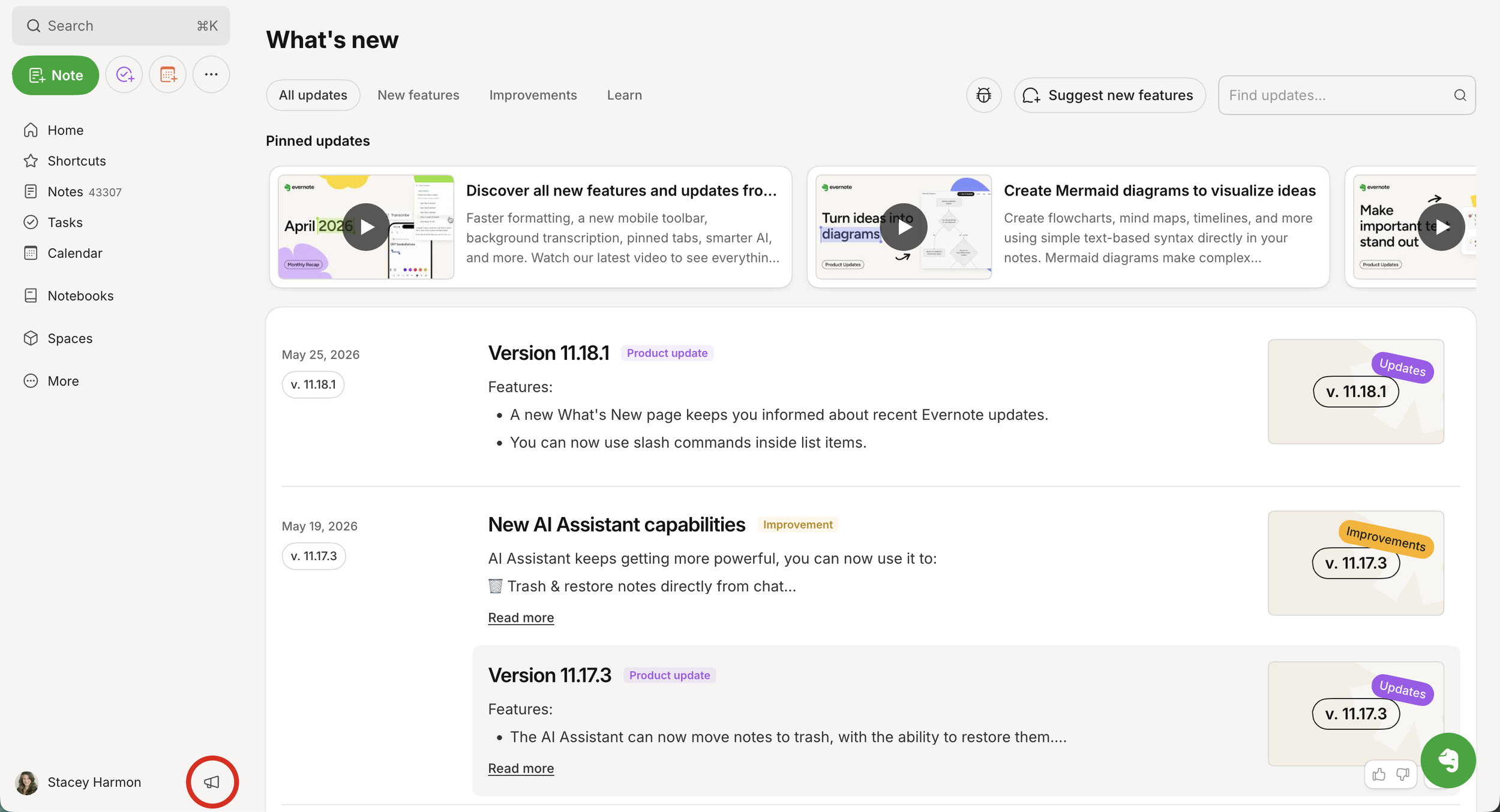
Each post is short, tagged by type, and searchable. A few minutes of skimming is enough to stay current without leaving the app.
The value here isn't any single post – it's what the dashboard removes. You no longer have to remember to check an external page, and you're far less likely to discover a feature months after it could have helped you.
This dashboard also doubles as a direct line to the Evernote team. File a bug report, or suggest a new feature using the buttons in the top right corner next to the search box.
When there is something new to see, the megaphone icon will show a red badge. Use that as your cue to check in on what's new.
🧠 Academy Members: Find a full overview of what's reflected on this page in the new lesson on the "What's New" Kingdom.
Let Evernote Come to You
This is one of those small additions that quietly pays off every week: the news now finds you, instead of you chasing it. Next time that red badge appears, give it a quick skim, note anything that touches how you actually work, and then move on with your day.
Cheers to your productivity –
Stacey

Subscribe to auto-receive my next tip!
No fluff. Just practical, immediately actionable advice from someone who's been teaching Evernote mastery for over a decade. Sent every Monday, for free.