
Linking to a Notebook, Stack, or Space 🎉
June 15 2026 | Issue 100 | Link to this issue | Subscribe
Hi Reader –
Evernote just launched a new feature last week that has me – and my community – very excited.

With v11.20.2+ (download the latest here), Evernote has changed how linking works: we can now link beyond Notes to Notebooks, Stacks, and Spaces.
Linking has always been my favorite Evernote feature. Discovering note links is what got me hooked on Evernote in the first place. It changed what I understood was possible with the app, and a whole new sense of what I could do with Evernote opened up.
And now...the links feature has evolved in a meaningful way.
Recent Link Innovation
After only one innovation to links under prior ownership – they added "backlinks" back in 2023 – links have finally been getting the love they deserve under Bending Spoons.
Late last year, Mention links arrived: rename a note, and the new title updates everywhere you've linked to it. I covered that improvement here.
What Evernote released last week is the next leap – and a transformational one.
Until now, linking worked note-to-note: grab a link to a specific note, drop it into another note. Handy and functional...but limited in scope.
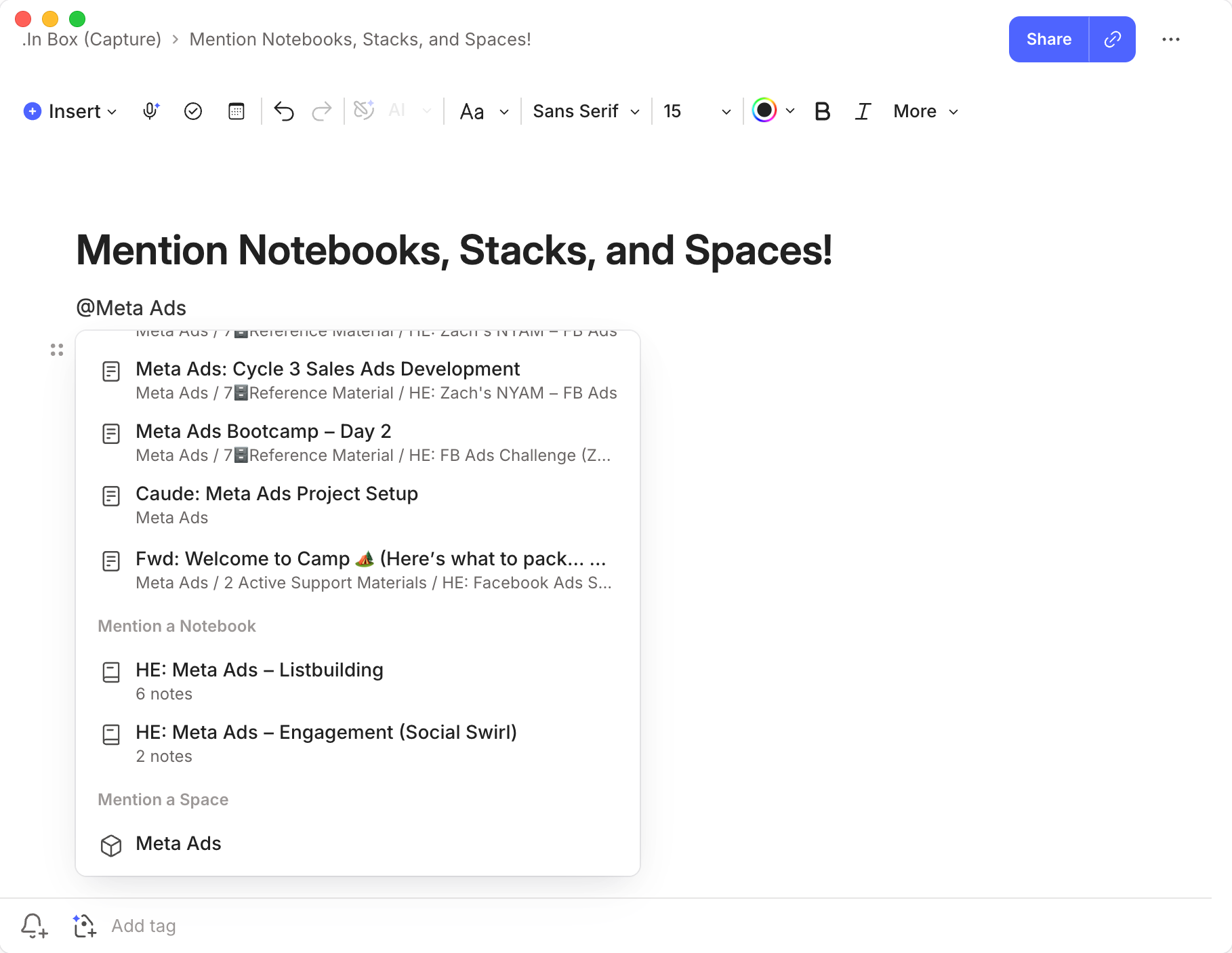
But now? Now you can link beyond notes to your containers: inside a note, type @ and choose a Notebook, Stack, or Space. The link drops in, and a click takes you straight to it. It's available everywhere you access Evernote (Desktop, web, and mobile).
Powerful Workflow Impact
My favorite impact of this feature is to the "Project Management Note" best practice I often teach inside the Academy.
The idea is simple: for every project, create one note that acts as its dashboard, populated with links to the related notes you're tracking, so the whole project has a single home base you operate from.
Historically, we've used that note to link only to other notes (this was our only option). It offers frictionless navigation around your account to the notes that matter for that project.
But the most common question I'd get from users who adopted the Project Management Note was always the same: Stacey, how do I link to a Notebook?
Now you can. And you can link not just a Notebook. Also a Stack. And a Space. 🎉
It's exciting because it unlocks new organizational options that make users' lives easier. And, exactly how it reshapes our workflows is an ongoing discussion inside the Academy.
Now that we have this option, how do you see yourself using it? Comment here if you're an Academy member. Otherwise, reply and let me know.
Cheers to your productivity –
Stacey

Subscribe to auto-receive my next tip!
No fluff. Just practical, immediately actionable advice from someone who's been teaching Evernote mastery for over a decade. Sent every Monday, for free.