
A framework to manage *any* project in Evernote
May 25 2026 | Issue 97 | Link to this issue | Subscribe
Hi Reader –
Evernote's flexibility is its greatest strength – and also the number one reason people get stuck with project management. Notebooks or Tags? Stacks or Spaces? One notebook or five? There's no obvious answer – and that uncertainty is what gets people stuck.
With over 15 years of using Evernote and coaching others through this, I've developed a project management framework that gives you a proven path no matter what size project you want to manage. It's the foundation of how I personally keep over 40,000 Notes organized in my account, and how my most successful Academy members use Evernote to manage their projects.
I recently taught this framework in detail inside the Academy, and today I want to share the core ideas with you.
🧠 Academy Members: Learn the full framework in the Workflow Workshop: Project Management Progression training.
Organization Isn't Engineered. It Emerges.
This is the single most important concept I can share with you about project management in Evernote.
Most people approach a new project by trying to build the perfect structure first. They create a stack, five notebooks, a dozen tags, maybe a template – all before capturing a single piece of information.
And then it doesn't work. The structure doesn't match the reality of what they actually collect. They spend time trying to fit square pegs into round holes, and eventually abandon the whole thing.
What I've observed is that organization is something that reveals itself over time. You don't know what structure you need until you start collecting. Think of it like moving into a new home – you wouldn't install a custom closet organizer before you've even unpacked your boxes and seen how many shoes you actually have.
So the approach I teach starts simple – and only expands when the need shows up.
Start Every Project the Same Way
Here's what I recommend for 100% of your projects, whether it's a tiny project or a massive one:
1. Create a single project Notebook
One Notebook. Give it a clear, descriptive name that represents what your mind would think of when you think of that project. Don't stress about the perfect name – you can rename a Notebook anytime.
2. File everything related to that project into that Notebook
That's it. Just put it in there. Often, this alone is enough for things to feel organized – because your brain remembers the Notebook exists, and when you click on it, you get a focused view of everything you've collected.
3. Title your Notes with intention
Put a short keyword at the beginning of each Note title. When you sort the Notebook by title, these keywords create natural groupings – and that's where organization starts to emerge.
Even better, titling your Notes sets you up for search success. You're essentially telling your future self what to look for.
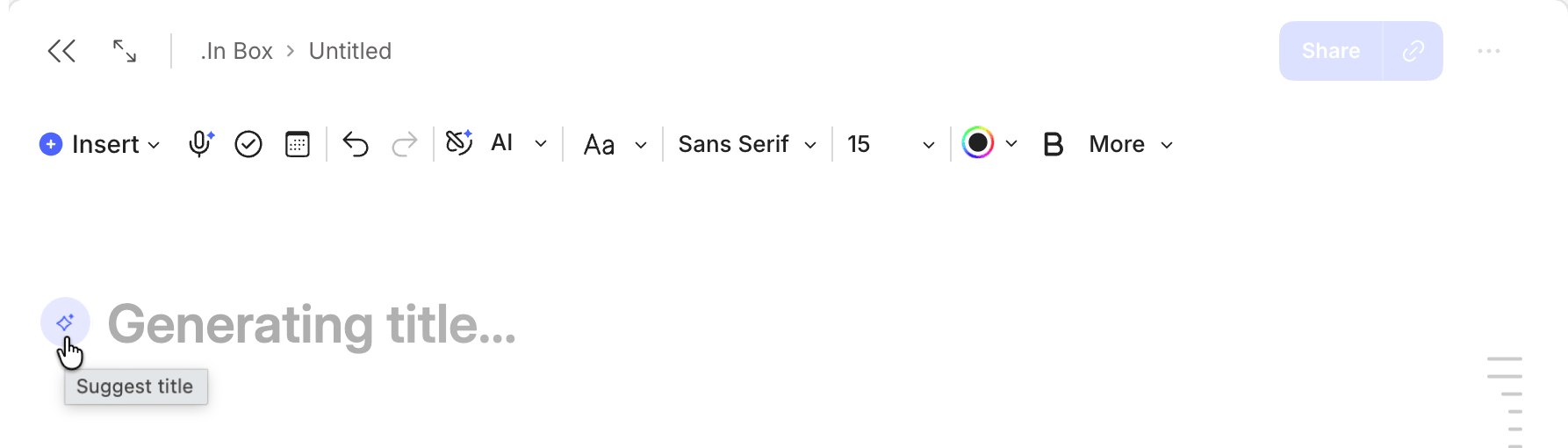
🔥 Tip: A short keyword at the beginning of each Note title is the single easiest thing you can do to stay organized. It makes sorting useful and search predictable. And if you're stuck on what to title something, Evernote's AI Title Suggestions feature (available on desktop and web for Notes with at least 250 characters) can do it for you in one click:
What This Unlocks
Between these three steps, you already have project management in Evernote. You don't have to do anything more.
There are additional layers you can add over time – a pinned project management Note that acts as a hub for each project, naming conventions that group related Notebooks together, Stacks for organizing multiple project Notebooks, and eventually Spaces for complex multi-notebook projects with collaboration needs. But none of that is required to get started.
The power of this approach is that you aren't pre-organizing. You're collecting first, reflecting on what you have, and then letting the structure reveal itself. It's the difference between building a system you hope will work and building one that actually fits your data.
Start Simple This Week
If you've been putting off organizing a project because you don't know the "right" way to set it up – create a single Notebook, give it a name, and start putting things in it. Title the Notes as you go. Sort by title. Watch the organization emerge.
You don't need the perfect system. You need one Notebook and the willingness to start.
Cheers to your productivity –
Stacey
PS: See what's new in Evernote. I walk through everything released in April in this free training on YouTube.
Tip: Paste the link in Evernote to watch the training ad free.

Subscribe to auto-receive my next tip!
No fluff. Just practical, immediately actionable advice from someone who's been teaching Evernote mastery for over a decade. Sent every Monday, for free.