
Your Evernote AI recap: what's here, what's new, & what's next
May 18 2026 | Issue 96 | Link to this issue | Subscribe
Hi Reader –
Not surprisingly, AI is the hottest topic inside my Academy right now. It comes up in live events, in community discussions, and in nearly every coaching conversation I have.
We've covered Evernote's AI features in this newsletter before – but the pace of development over the past few months warrants a fresh look. So today I want to walk you through where Evernote's AI stands right now, what just got better, and what's coming down the road.
The Three AI Features You Already Know
I've covered all three of these in the newsletter before. But since v11 launched in January, all have evolved – so here's a quick refresher of the first three Evernote AI features:
AI Assistant – Think of this as having ChatGPT or Claude built directly into Evernote. You can ask it questions, have an ongoing iterative conversation, and work with your note content without switching apps. Currently available on desktop and web.
Semantic Search – This takes search beyond keywords by understanding the meaning behind your query. Search for "vacation planning" and it can surface a note titled "Trip to Portugal – Spring Ideas."
AI Meeting Notes – Record a meeting (in person or online) directly from the note editor, and Evernote generates a transcript and summary with speaker recognition.
What's Improved Since v11 Launched
Here's a list of key improvements that have shipped since these features first launched in January.
AI Assistant:
Dictate requests instead of typing them
Performance:
Better speed and reliability
Process 100+ notes in a single query
Tasks: Create and update, including adding due dates, priorities, descriptions, and flags
Templates: Create, pin, and open
Tags: Apply and manage
Note Reminders: Set, update, and clear
Settings: Customize the AI Assistant icon
Mermaid Diagrams: Create flowcharts, timelines, or process diagrams that render visually inline
AI Meeting Notes & Transcription:
Record up to 2 hours per session (up from 1 hour)
Background transcription processing: Work in other notes while recordings transcribe
Partial Transcription: Transcribe just a segment of a recording. Very useful when you only need a specific section of a long meeting.
Faster transcriptions when speaker recognition isn't needed
Audio Format: New audio recordings are saved as MP3 for increased cross-device playback
Transcribe Media: Upload images, audio, or video files to trigger AI transcription of the file.
Semantic Search:
Clearer separation between Semantic Search and standard search results. You now get your standard search results instantaneously, even if Semantic Search is still thinking.
New AI Features
Beyond improving the original three, Evernote has also added a couple of new AI-powered features:
Title Suggestions
For any notes with at least 250 characters in the body of the note, you can click a button and Evernote will generate a suggested title. This is a great complement to my longstanding "Title & File" recommendation which is a key habit that keeps your account organized over time.
Titling your notes just got simpler. If you're stuck on a title, or simply don't want to type it, use the Title Suggestion option. You can edit what it comes up with before filing the note if you like.
New Settings for AI features:
With all that is new in AI in Evernote, it's not surprising to see a reorganization, and expansion, in the area of user settings in regards to AI settings and preferences. Evernote puts the users in control of what AI features you use and has recently expanded and updated access to your AI permissions and settings screens. Now available as their own section inside your settings, it's worth a review to ensure you're opted in (or out) of what you want to use.
Memory
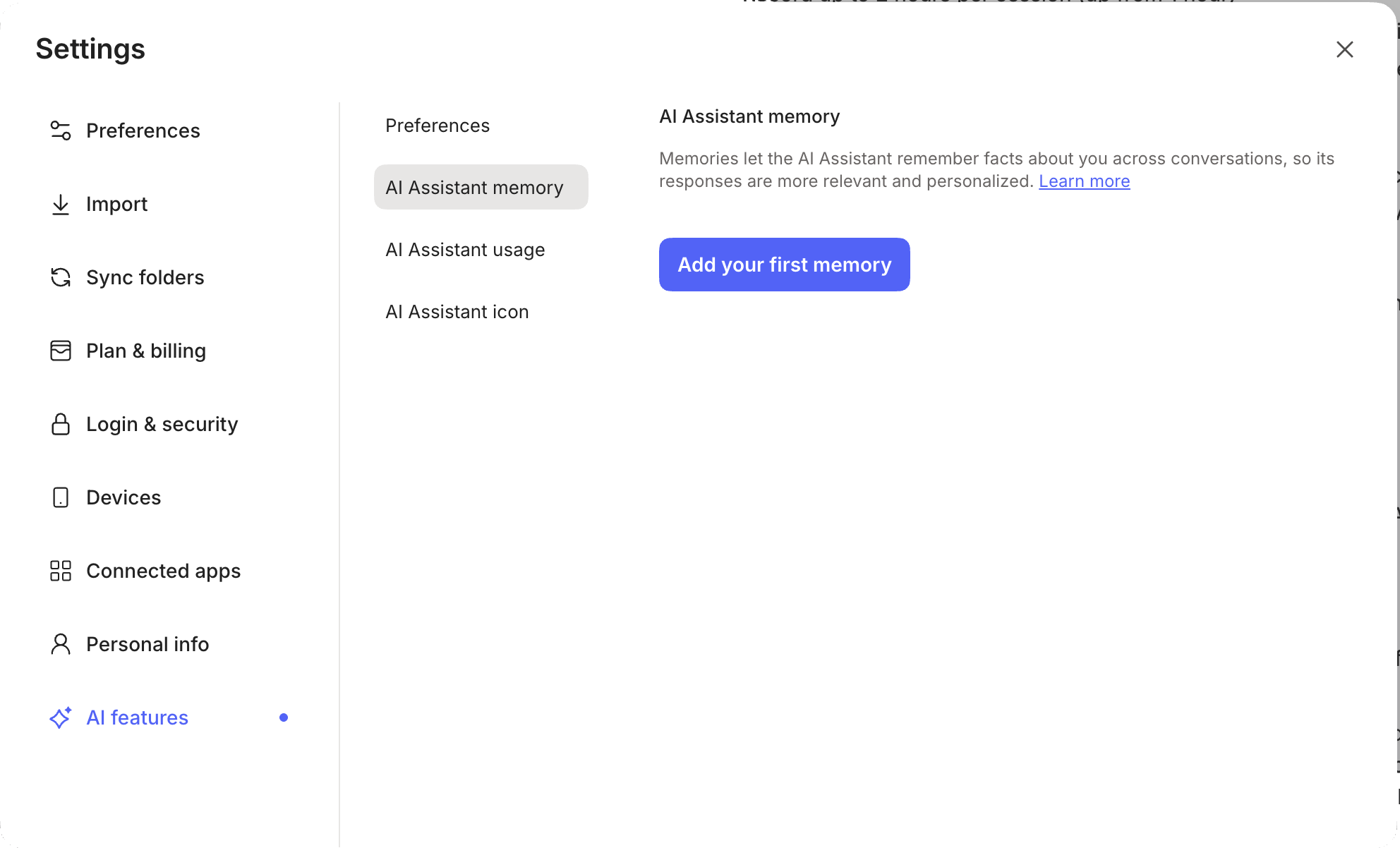
Accessed from your desktop settings, you can now add and manage AI Assistant memories to personalize the responses you get from AI Assistant.
🧠 Academy Members: Dive deeper with the full trainings on AI Assistant, Semantic Search, AI Meeting Notes, and the new Title Suggestions and AI Features Settings (including Memory).
What's Coming
Evernote's publicly stated that innovation will continue to its AI features, and even tipped their hat as to what to expect next. Here's what they've shared is on the horizon:
AI Assistant on Mobile. Currently, AI Assistant is desktop and web only. Mobile access is in development. When it arrives, it will make the AI features useful in more of the places where you capture and review notes.
AI Prompts. Save reusable prompts for AI Assistant that you can use across Evernote. If you find yourself asking AI Assistant the same types of questions – summarize this meeting, extract action items, draft a reply – saved prompts will let you do that in one click instead of retyping every time.
Evernote MCP (Model Context Protocol). I mentioned this last week, but it's worth repeating: Evernote launched a waitlist for MCP on May 6. MCP is the open standard that lets AI tools like Claude connect directly to your apps – including Evernote. I signed up for the waitlist immediately, and I'm personally excited about what this will mean for using AI with my Evernote account. If you're curious, you can join the waitlist at evernote.com/mcp.
Keep Learning
If there's one thing that's clear right now, it's that AI innovation is hard to keep up with. It's moving fast – and Evernote is evolving right along with it.
I'll continue to keep you updated here in the newsletter as major AI developments land in the app. And of course, we talk about this all the time inside the Academy – just this week, members were sharing how they're prompting Claude and ChatGPT to format information for easy capture into Evernote. If conversations like that sound useful to you, come join us.
Cheers to your productivity –
Stacey

Subscribe to auto-receive my next tip!
No fluff. Just practical, immediately actionable advice from someone who's been teaching Evernote mastery for over a decade. Sent every Monday, for free.