
The shock Teams subscribers are experiencing
Hi Reader –
A Canadian reader wrote to me recently. She's been administering Evernote business accounts for companies since 2014, through every name change and repositioning the product has seen. She was staring at a renewal notice for one of her clients: C$2,576 per month for four users.
She was baffled. This is a huge price jump from what it's been. And she wasn't alone — I've been fielding versions of this question for months.
So today I want to address the piece of Evernote's 2025 subscription "repackaging" I haven't covered in detail until now: the impact on Teams accounts and what your options are.
(If you're on a legacy individual plan – Personal or Professional — Issue 71 covered your situation. Today's issue is for anyone subscribed to Evernote through a business account.)
The Evernote Teams account has a new name — and a new audience
Evernote has always had two distinct account types: individual accounts and business accounts. They're separate entities. For the most part, both types offer the same features. But business accounts include an administrator function, security tools required by IT departments, and the business (not the user) owns the data. If an employee leaves, they lose access to everything in that business account.
Business accounts have gone through several names over the years: It was first called Evernote Business, then rebranded to Evernote Teams, and in 2025, renamed Evernote Enterprise.
This latest rebranding comes with a significant repositioning of who it's designed for. And a big new price tag.
The transition from Teams to Enterprise is a rolling one. While many accounts have already been migrated to Enterprise, others are still on the legacy Teams plan. You'll hear about it 30 days before your renewal date, so it will take a full year for all Teams accounts to be transitioned to the new Enterprise plan.
That 30-day window is easy to miss. If you log into your account settings right now to check your next bill, it may still show the old amount — Evernote doesn't update the rate you see until approximately 30 days before renewal. That's also when your one notification email goes out, to the email address tied to your Evernote login. Keep an eye out for this email – it's important. (Reminder: I don't work for Evernote and have no control over how this is handled. I'm just educating you on what Evernote does here.)
My suggestion: log in now and find your renewal date in your settings under Account Info -> Billing. And, I would proactively reach out to Evernote to understand what you new rate will be if you're still seeing your Teams renewal rate. In addition, set yourself a reminder to check this page again about 30 days before your renewal. At this point, you should know your new rate and you'll have a a little runway to decide what you want to do, and act.
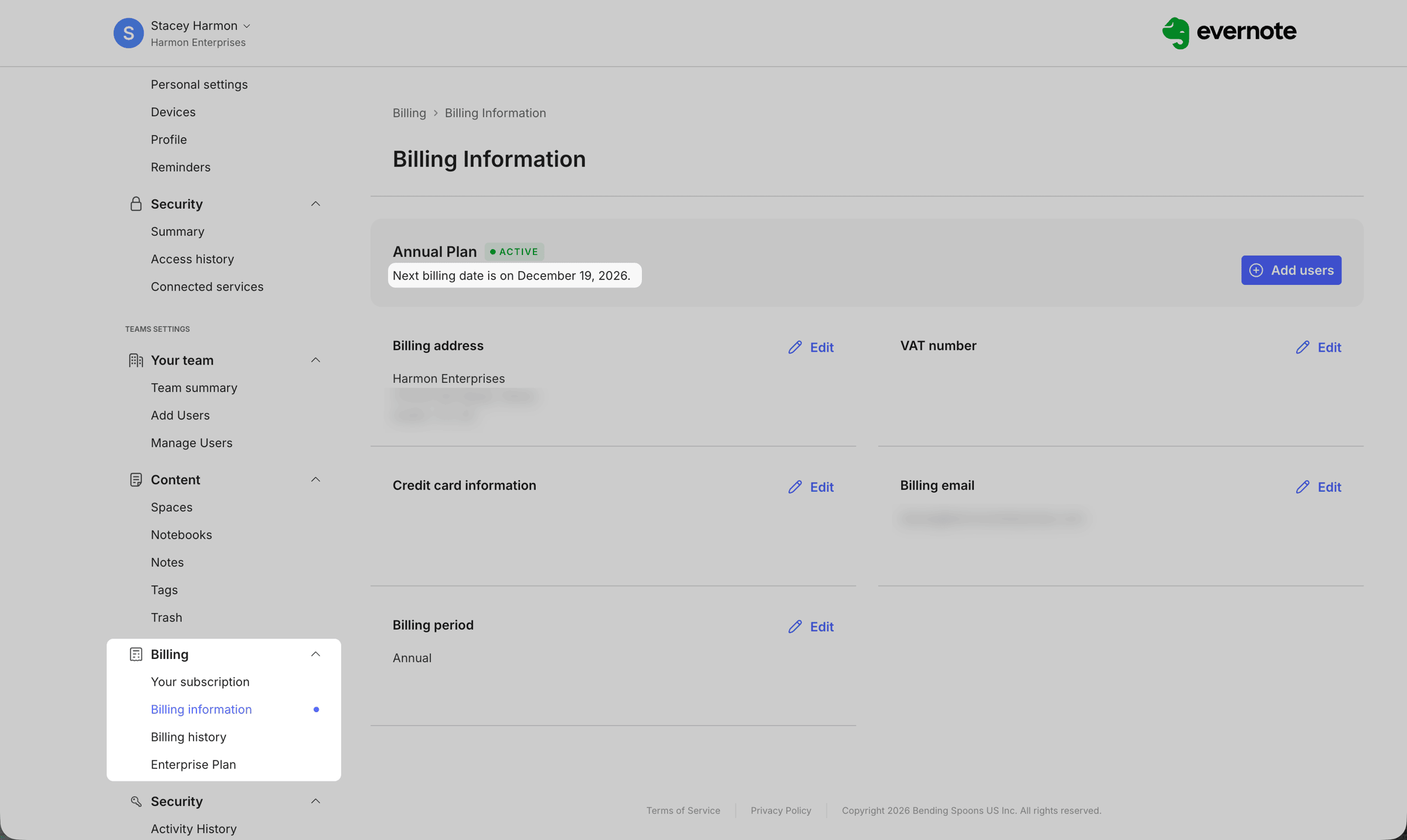
How to locate your re-bill date on Evernote Teams / Enterprise
When the notice of your new price arrives, administrators are likely to be shocked. The price change is significant — and it reflects a completely new target audience for the product. That's what had my reader staring at her screen.
🧠 Academy Members: Get clarity on the full current plan structure — and post your specific situation for guidance — in the lesson on Evernote's Service Plans.
Why the pricing jumped — and why it's likely to stay there
The old Teams plan was built and actively marketed for small groups: typically a handful of users, 2 to 10 seats. That positioning is gone.
Evernote Enterprise is now targeting organizations with big seat counts (30+), with annual contracts in the $20,000+ range. Pricing is custom and now based on several factors: billing period (monthly or annual), number of seats, and volume of data in your account. To get a clear price you contact Evernote sales for a quote. Small teams are no longer the target customer for this product, and the pricing reflects that.
Teams subscribers can sort through a complex table of how pricing is calculated in their Account settings under Billing → Enterprise Plan:
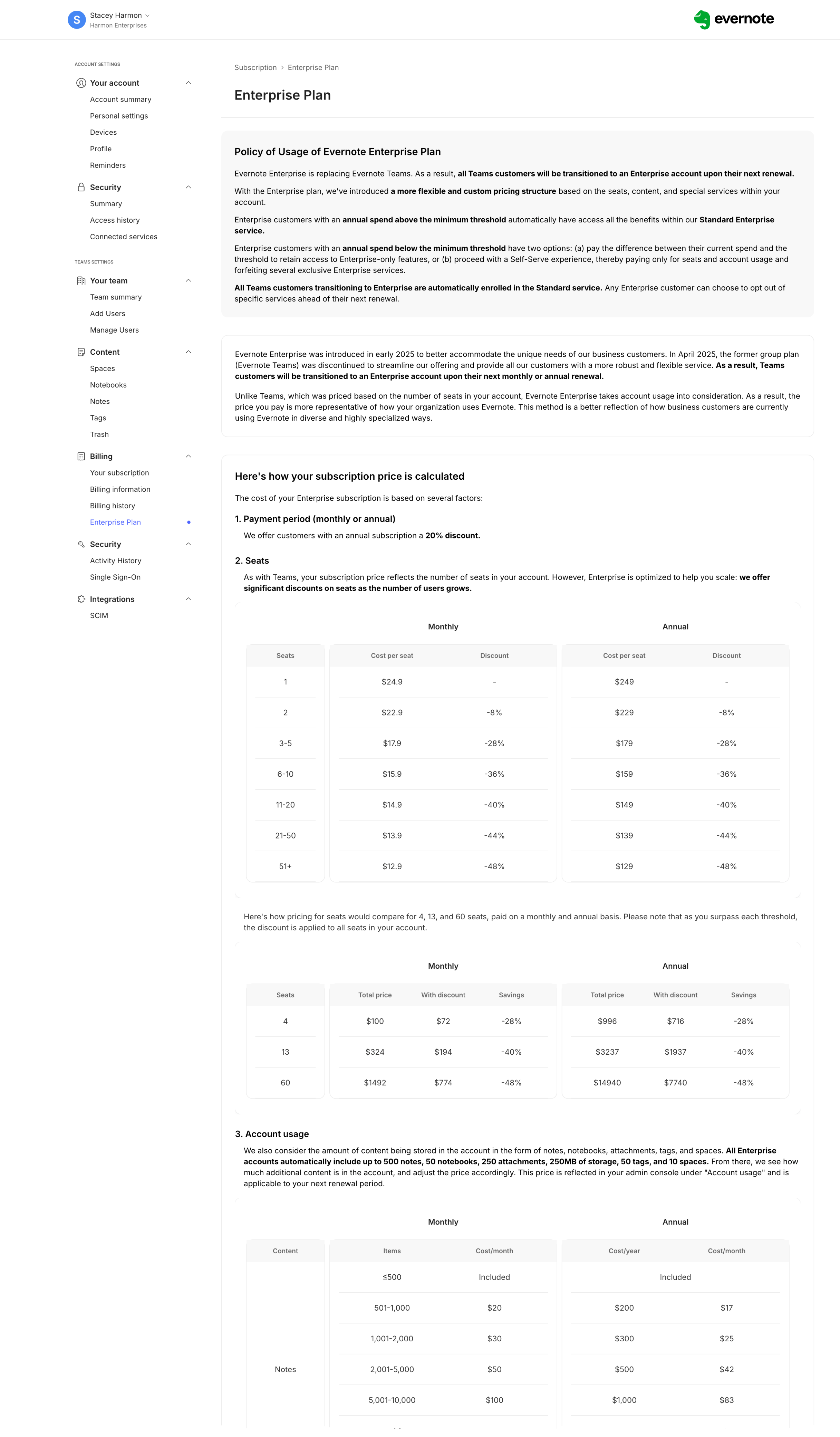
Just a portion of the Enterprise pricing page inside the admins account.
This didn't happen in a vacuum. Bending Spoons — Evernote's parent company — listed on the Nasdaq just last week under the ticker BSP, raising $1.68 billion in their IPO. My guess is that Enterprise customers who generate $20K+ per year are exactly the kind of revenue story a newly public company tells its shareholders. I expect this positioning to hold.
If you're running a small team – say 2 to 5 seats – from a pricing standpoint, you're better served now by Evernote's Advanced plan, an individual type of account.
The problem with switching to Advanced: you can't simply change your subscription to get there. The Advanced plan is an individual account type, not a business account type. A data migration is required to downgrade to an Advanced plan (see Option 3 next).
Three options for Teams Accounts
1️⃣ Stay with Enterprise. If your organization has the seat count and budget Enterprise is designed for, it may still be the right tool. You don't need to do anything. You'll be automatically transitioned from Teams to Enterprise upon renewal. If you don't see your new price in the Billing section of your account, proactively contact Evernote to get your new rate.
2️⃣ Move to a different tool. Some account holders — particularly those with underused Teams accounts who feel the new pricing doesn't fit their actual use — are making this call. My advice to this group: start planning your exit now, before your renewal hits, especially if you want to retain the data already in your account.
3️⃣ Migrate to an individual Advanced plan. If you're a small team — the kind of organization the legacy Teams plan previously targeted — this is likely where you belong now.
The Advanced plan is effectively what Evernote is pointing legacy Team accounts toward. The collaboration features are solid, the pricing is manageable for a small business, and it's a better fit than paying for an Enterprise contract designed for an enterprise-sized organization.
One critical thing to understand before you start: switching between account types requires data migration. You cannot simply change your subscription. Migrating takes time, planning, and attention to detail. It's a focused effort. This Evernote Help & Learning article highlights the steps to take.
Learn More
Free: Evernote's Help & Learning site has an Evernote Enterprise guide that includes a dedicated section on Individual vs Teams accounts. This is a good self-education option for any Teams account holders looking to understand more about this transition.
Paid: If you're navigating out of Teams and want guided support, the Academy has the resources you need. You'll get clear on your plan, learn the skills required to manage a successful migration, and have access to me for questions along the way. Multiple Academy members have already completed their migration using what's taught inside. Join the Academy
Cheers to your productivity –
Stacey

Subscribe to auto-receive my next tip!
No fluff. Just practical, immediately actionable advice from someone who's been teaching Evernote mastery for over a decade. Sent every Monday, for free.