

Hi Reader –
Ever started organizing a project in Evernote, spent 20 minutes deciding between notebooks, tags, spaces, and stacks... only to abandon the whole thing because it felt too complicated?
You're not alone.
Evernote's flexibility is actually why most users fail at project management. When everything is possible, nothing feels clear.
Users get stuck analyzing every option instead of just starting. This "flexibility paralysis" is the top reason I see abandoned systems and chaotic Evernote accounts.
So let's cut through the noise with a simple framework that actually works.
The First Key Decision:
Before you create a single note, you need to answer one question: Notebooks or Tags?
I'm firmly in the notebooks camp, and I coach all my Academy members to make this their default starting point.
Fully understanding why is an education process, but it boils down to this:
Notebooks are simply more efficient when organizing large volumes of project data. Tags should be reserved for what they do best — advanced search and filter functions.
Once you commit to the notebooks approach, everything else becomes clearer.
🧠 Academy Members: Dive deeper into my best practice framework for project management in Lesson: Notebooks, Tags, Stacks, or Spaces.
My 3-Step Project Management Framework
Here’s my framework for project management inside Evernote:
Step 1: Start with a Single Note
Create one notebook called "Projects."
Begin each project with a single note inside it.
Use collapsible headers, a table of contents, and links to supporting notes.
Adopt a naming convention (Mine: "Project Management: [Project Name]").
Step 2: Graduate to Dedicated Notebooks
Once you have multiple notes for a project, create a dedicated notebook.
Move your main project note there and pin it to the top of that notebook.
Move your supporting project notes to this new dedicated project notebook.
Use consistent naming conventions across all project notes to group like notes together.
A huge percentage of projects can be organized in Evernote using just these 2 steps. It’s what I do most of the time.
For example, I’m in the process of posting 30 days of Evernote tips on LinkedIn (do you follow me there?). I use just steps 1 & 2 to organize this project:
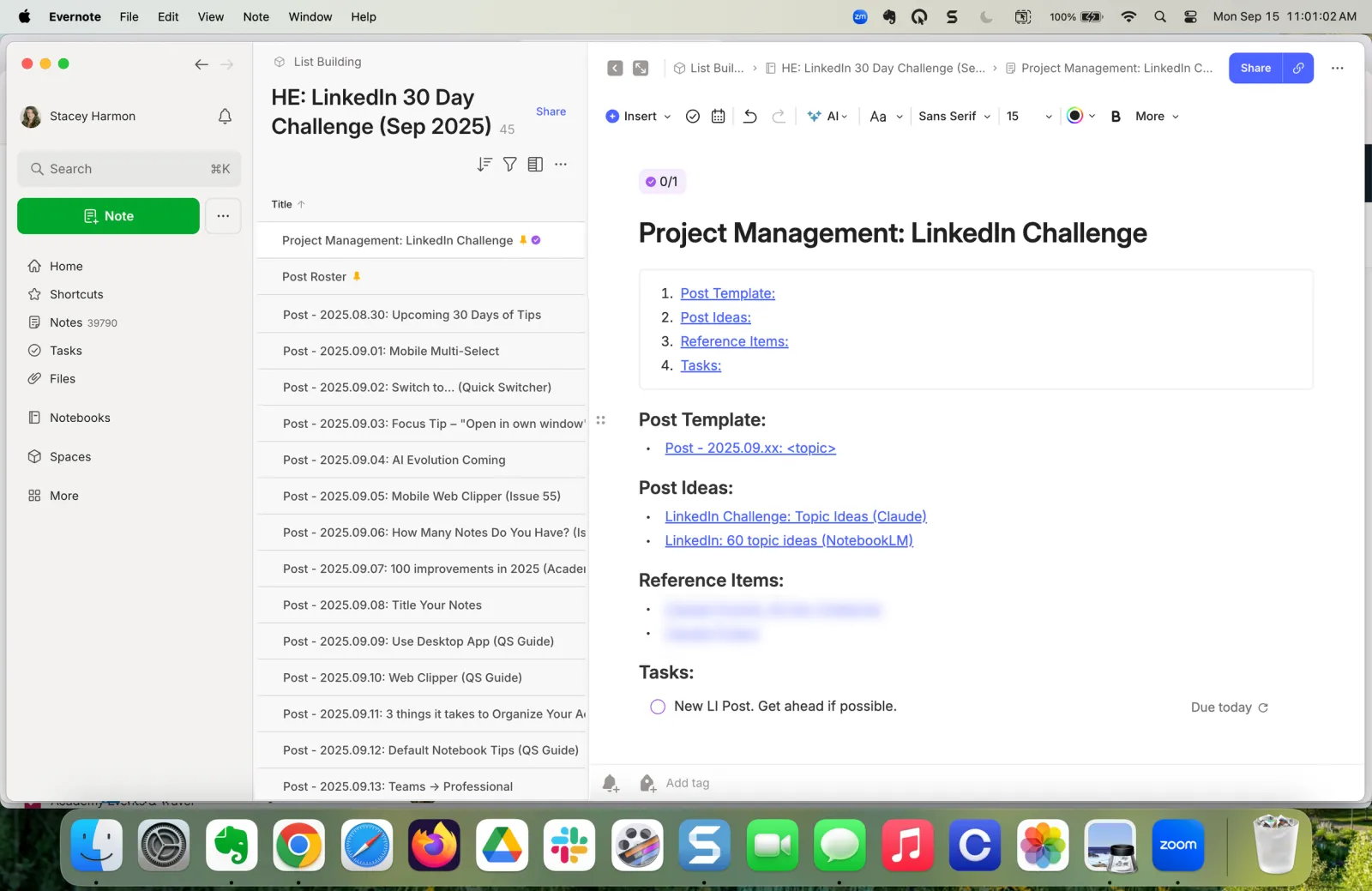
Step 3: Scale for Complex Projects Slowly
For large projects with phases or sub-goals, you can expand your project management organization by creating additional project notebooks.
⚠️ Warning: Most people over-optimize here. Only add notebooks when it becomes clear you need to, not if you think you should.
Use naming conventions to group your related project notebooks together.
Group them in a Stack if needed.
This covers most complex scenarios without overcomplicating things.
Note: Skip Spaces (For Now)
I know Spaces look tempting for project organization, but don't jump there too soon.
If you can't manage your projects in notebooks effectively, Spaces won't save you. Master the fundamentals first, then only migrate when the benefits are obvious.
🧠 Academy Members: See this framework in action with my real-time Case Study: Evernote for One Notebook Project Management, where I show exactly how I set up and manage a project from start to finish.
Start Simple Today
This approach works because you start simple with just one note. As project requirements become clear and complexity grows, you layer on structure, step by step.
That’s how you avoid overwhelm while building habits that scale.
The goal isn't to build the perfect system from day one. It's to start with something that works and evolve it as needed.
What kinds of projects do you want to organize in Evernote? Hit reply and let me know. I’ll dive deep into these use cases in future newsletters.
Cheers to your productivity —
Stacey