
Evernote v11 is finally here 💚
January 26 2026 | Issue 80 | Link to this issue | Subscribe
Hi Reader –
If you’ve been using Evernote for a while, you’ve lived through a lot of updates.
But nothing quite like this.
Last Monday, Evernote released version 11 — the biggest update since v10 launched back in 2020. And it’s transformative.
V11 isn't about a new look an feel – although there has been polish and refinements. The real story is that Evernote has added powerful AI features that fundamentally change how you interact with your notes. For those of us who’ve been building our “second brain” in Evernote for years (or decades), these tools unlock the value of everything we’ve stored in ways that weren’t possible before.
I’ve been working with these features for a while now, and honestly? They are transforming how I work in Evernote. Workflows are shifting, efficiencies are being captured, and the need for tools outside of Evernote are diminishing.
Let me walk you through what’s new and available to users on all plans (even free!).
The Big Three: AI Features That Actually Matter
V11 introduces three AI-powered features designed to make your notes work harder for you. These features are now available for all users – even those on Evernote’s free plan:
1. AI Assistant
This is the headline feature — and for good reason.
AI Assistant is a chat-based tool that lives inside Evernote. Access this new chat drawer through the circle icon found in the lower right hand corner of the desktop and web clients:
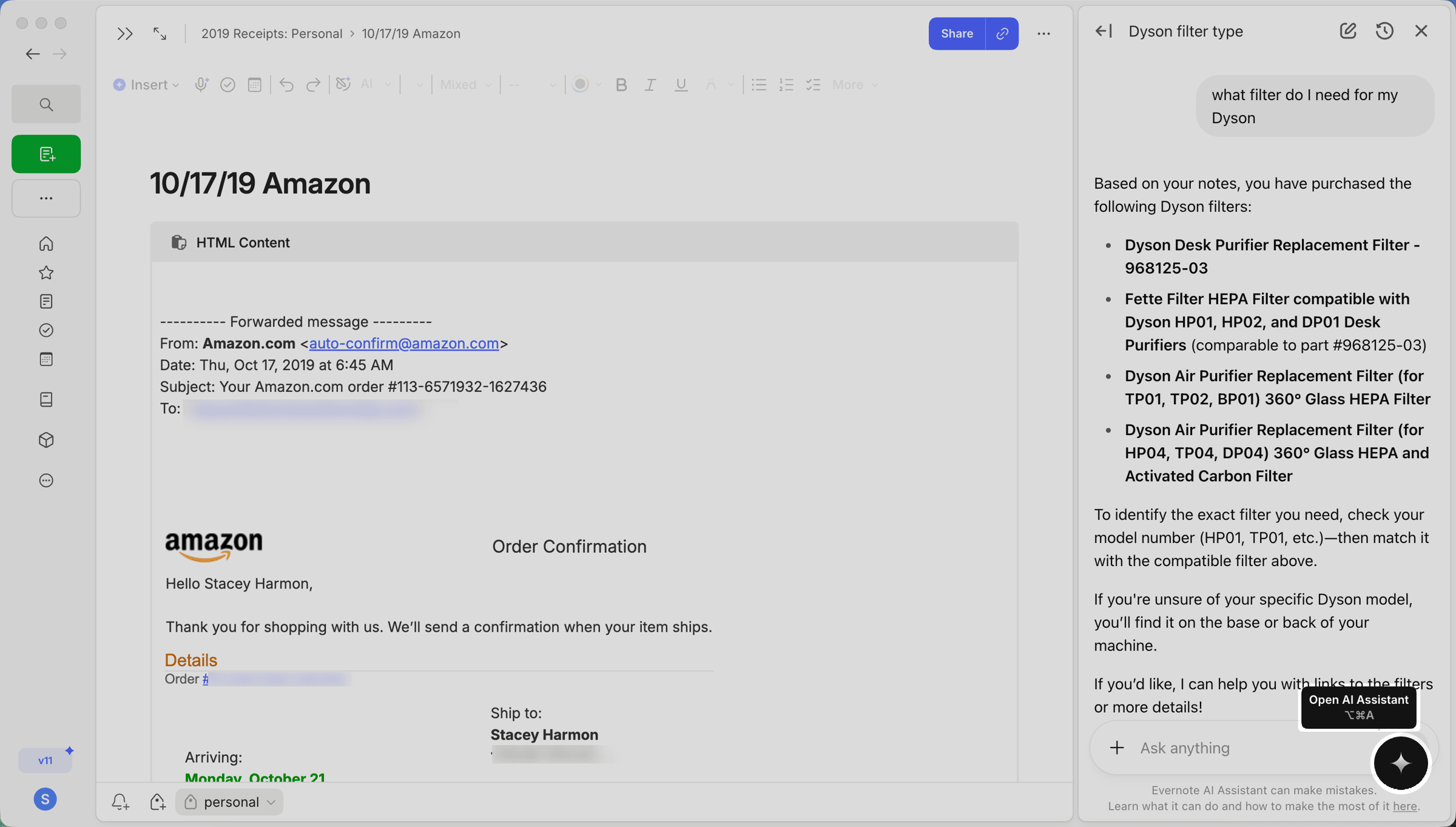
Ask it questions, and it will search your notes, pull relevant information, and even take action on your behalf.
Here’s what it can do:
Search and surface information from your notes. Ask “What’s the confirmation number for my flight?” and it finds it — even if you don’t remember which note it’s in.
Generate and modify content. Ask it to summarize a long note, create a packing list based on your travel notes, or turn a section of text into a table.
Execute actions. It can create new notes, move notes between notebooks, and add tags (with even more capabilities coming soon).
Search the web. Need additional context? AI Assistant can pull in information from the web without leaving Evernote.
The power here is in how it connects to YOUR data. This isn’t a generic AI chatbot. It’s an AI that knows what’s in your Evernote account and can help you work with that information.
Longtime users with years of accumulated notes and knowledge are especially going to love this!
We're actively discussing and sharing AI Assistant use cases and tips inside the Academy. In future newsletters, I'll share themes and ideas that emerge to help you make better use of the AI Assistant.
AI Assistant is available on Desktop and Web for all v11 users.
🧠 Academy Members: Get up to speed with the Feature Training: AI Assistant, and don't miss the successes your fellow members are already sharing. Plus, plan to join our live conversation happening February 12, where we share how we're actually using it during the Community Roundtable on AI Assistant.
2. Semantic Search
This one has been on Evernote users wish list for years.
Previously, Evernote search relied only on keyword matching. If you searched for “Spain vacation,” you’d only find notes that contained those exact words.
Not anymore.
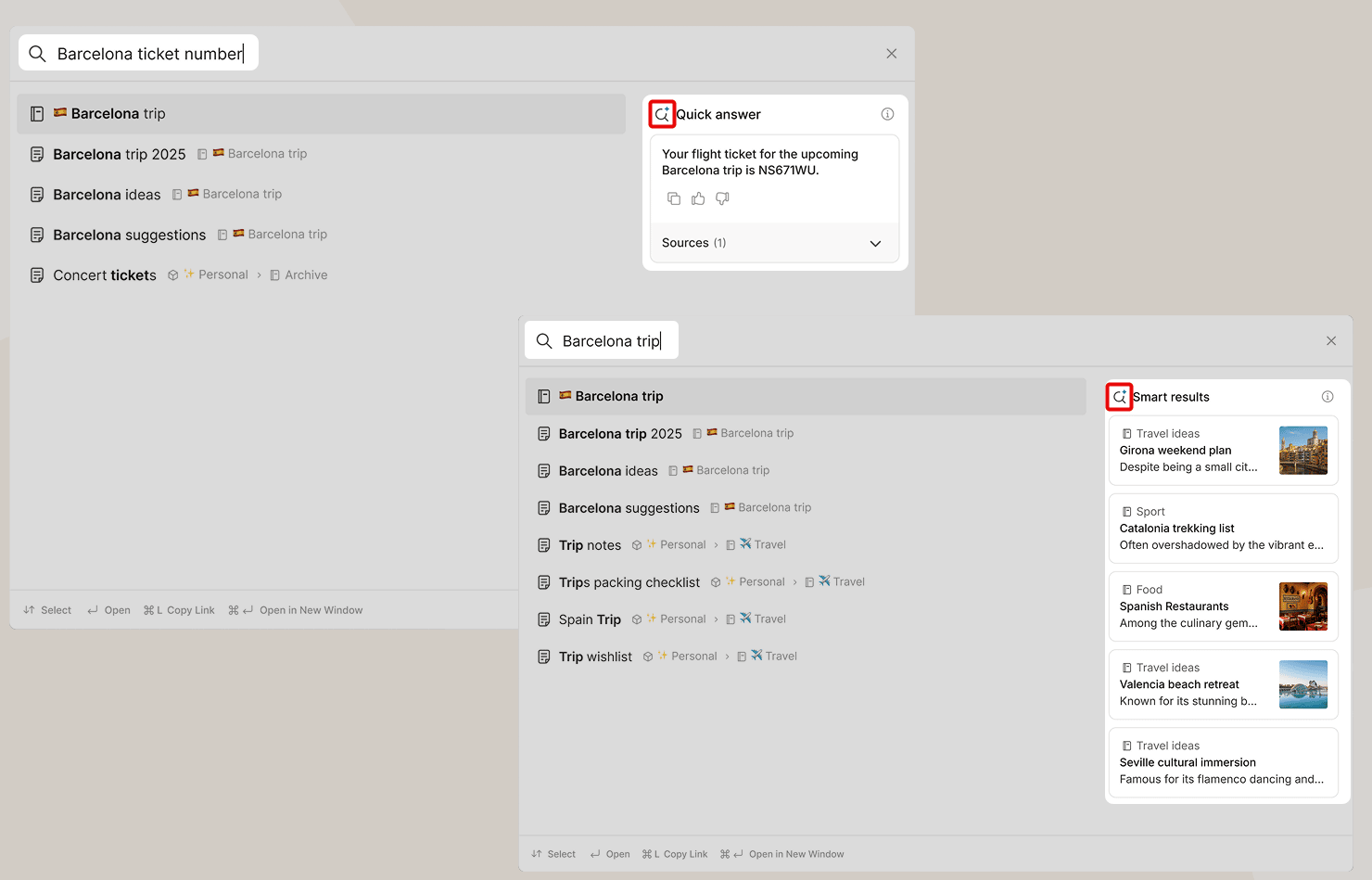
Semantic Search understands meaning. Search for “Spain vacation,” and Evernote will also surface notes titled “Barcelona Trip” or “Valencia Hotel” — even if the words “Spain” and “vacation” don’t appear anywhere in those notes.
Even better, it can identify and display key details right in your search results. Search for “flight confirmation,” and you might see the actual confirmation number displayed prominently, with a link to the relevant note.
Semantic search is found in the existing search modal. Just conduct a search as you always have, and semantic search results can appear alongside the key word search results you're already familiar with.
When semantic search kicks in, you'll see "Quick answer" and/or "Smart results" in the search modal. Look for the new magnifying glass icon 🔍 which indicates it's a semantic search result:
For anyone with hundreds or thousands of notes, semantic search unlocks powerful new ways to retrieve information you've captured over the years.
Semantic Search is available on Desktop, Mobile, and Web.
🧠 Academy Members: Join me for the live AI Semantic Search feature training tomorrow (January 27th) where I’ll walk you through how to get the most out of this new search experience.
3. AI Meeting Notes
If you’ve been using Evernote’s transcription feature, this is its evolution.
AI Meeting Notes lets you record meetings (in-person, virtual, or hybrid), automatically transcribe them with speaker recognition, and generate a summary — all within Evernote.
This is perfect for capturing conversations when you need to stay focused on the discussion rather than scrambling to take notes. The current limit is one hour of recording, but Evernote is actively working on extending this. Learn more about this feature from this newsletter I sent last month.
AI Meeting Notes is available on Desktop, Mobile, and Web.
🧠 Academy Members: Learn how to get the most out of AI meeting notes in our Feature Training: AI Meeting Notes.
A Note on Privacy
Not everyone wants AI analyzing their notes — and Evernote gets that.
V11 includes new settings that let you enable or disable each AI feature individually. You'll find these in your Preferences. If you want the benefits of Semantic Search but aren't ready for AI Assistant, you can configure it that way.
Beyond AI: What Else is New
V11 isn't only about AI. There are some nice quality-of-life improvements worth mentioning:
Revamped Insert Menu — You can now search items directly, pin frequently used options, and see keyboard shortcuts at a glance.
Updated Slash Commands — The / menu got a makeover. Apply text styles, access formatting options, and use new aliases to find things faster.
Custom Link Previews — Choose how internal and external links display in your notes (mention, title, preview, or standard URL). Link mentions also update automatically when the source note's title changes.
Inline Calculations — Evernote can now do basic math as you type. Handy for quick calculations without switching apps.
New Account Menu Location — Your account info has moved to the bottom of the sidebar, giving priority to Search and New Note creation at the top.
Join Me Live to Break It All Down
There's a lot to cover here, and I want to make sure you understand how to take advantage of these new features.
I'm going live on YouTube this Wednesday, January 28th at 1:00 pm CT to walk through everything new in v11. It’s free to attend.
I'll demo the new features, share my early impressions, and answer your questions in real time.
Whether you're excited about AI or skeptical about it, this session will help you figure out how (or whether) to incorporate these tools into your workflow.
Hope to see you there!
Cheers to your productivity —
Stacey

Subscribe to auto-receive my next tip!
No fluff. Just practical, immediately actionable advice from someone who's been teaching Evernote mastery for over a decade. Sent every Monday, for free.